

Use After New Battery Install to test a newly installed battery in a vehicle. Where applicable, the process will also include registering the battery in the vehicle and a Reset Electronics checklist.
At any time during the test, tap

to return to the previous screen; or

to return to the Main Menu.
Battery Test
- Connect the DCA clamps to the battery.
- At the Main Menu, tap After New Battery Install. You will be prompted to scan the VIN.
- Use a connected bar code scanner to scan the VIN bar code, usually located on the driver’s side door frame. The VIN can also be entered manually. For best results, use the barcode located on the driver’s side door frame.
Driver’s Door Frame:

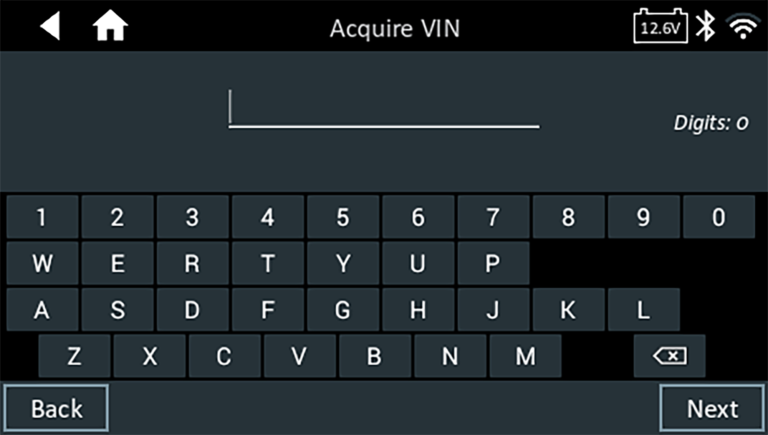
Manual Entry:
Use the on-screen keypad to manually type the 17-digit VIN — the displayed digit counter will count up the alphanumeric characters as they are entered on the keypad. Tap NEXT.
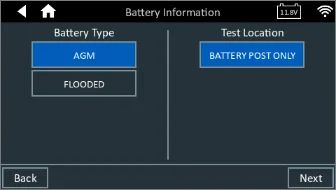
4. The battery information screens are displayed. Start by selecting the Battery chemistry and test location.
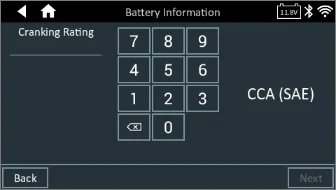
Next, select the cranking and capacity ratings.

5. Confirm your battery information inputs, and select Next to proceed. If you need to revise any selections, press back and return to the screen needing the change.

6. The DCA will begin to perform its diagnostic process and go through its tests for Conductance, Conductance Profiling, and Further diagnostics. Once completed it will display the Test Results screen.
7. Once the test has completed, you will see the results summary. Swipe right to see the results of the individual tests. Otherwise, if you would like to print or email the results, select Output Result. Otherwise, press Done to return to the Home screen.
